



22Bet gives you two ways into your account on a phone: your usual password, or a one time code sent by SMS. This guide covers both, plus recovery and the errors Nigerian players hit most often.
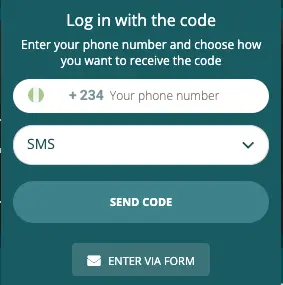
Log In to 22Bet With an SMS Code
If you cannot remember your password, you do not always need to reset it. The SMS route signs you in with a code instead.
- Open the 22Bet app or mobile site and tap log in.
- Select the SMS login option on the login screen.
- Enter the phone number registered to your account.
- Tap to request the code.
- Enter the code from the SMS and confirm.
This gets you in without touching your password, which is useful when a match is about to start. It only works if the registered number is still active on your phone.
How to Log In to the 22Bet App
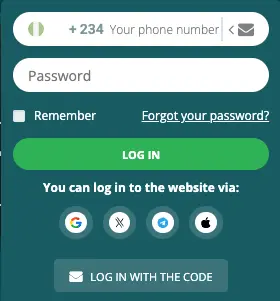
- Open the 22Bet app.
- Tap the menu icon to bring up the login panel.
- Enter your email, phone number or account ID.
- Enter your password.
- Tap log in.
The Android and iOS builds follow the same sequence, so one set of steps covers both. Desktop uses the same credentials and the same sequence.
How to Log In on the 22Bet Mobile Site
Use the same credentials as the app. Open the site in your phone browser, tap log in at the top of the screen, enter your identifier and password, then confirm. There is no separate 22Bet registration for the mobile site.
How to Recover Your 22Bet Password
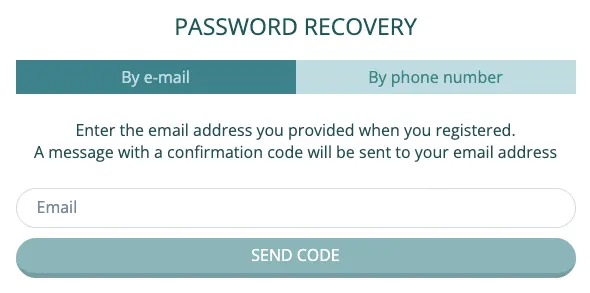
- Tap log in, then tap the forgotten password link below the fields.
- Choose to recover by email or by phone number.
- Enter the registered address or number and request the code.
- Enter the code you receive.
- Set a new password.
The recovery options are not identical everywhere. Check what the app shows you before assuming email recovery is available, and use the mobile site instead if the app only offers the phone route.
Why You Cannot Log In to 22Bet
| Problem | What to do |
|---|---|
| Wrong identifier | Try your account ID if your email or number is not accepted |
| Password rejected | Use recovery rather than repeating attempts |
| SMS code not arriving | Check signal, then request one fresh code |
| Recovery option missing in the app | Open the mobile site and recover from there |
| App will not load or crashes | Clear the app cache, then reinstall the current version |
| Registered number no longer in use | Contact support, the SMS routes will not reach you |
| Account blocked or under review | Contact support with your account ID |
If You Changed Your Phone Number
Both the SMS login and the phone recovery route depend on the number attached to your account. If you have changed SIM or lost the number, update it in your profile while you still have access. Once you are locked out, the only way back is through support and identity checks.
22Bet Account Verification
Verification and login are separate. You can normally sign in on an unverified account, but 22Bet withdrawals require documents. If you are stuck at the login screen, verification is not what is blocking you.
Keeping Your 22Bet Account Safe on a Phone
Do not save your password in a shared browser. Log out rather than just closing the app if someone else uses your phone. Use a unique password, since a reused one that leaks elsewhere puts your balance at risk.
Frequently Asked Questions
Can I log in to 22Bet without my password?
Yes, if you use the SMS login option and still have access to the registered phone number.
Where is my 22Bet account ID?
It is generated when you register and appears in your profile once you are signed in.
Does the 22Bet app log me out automatically?
The app holds your session between visits. Use log out on a shared device rather than relying on closing the app.
Can I log in to 22Bet on more than one phone?
Yes. The account is not locked to a device, though signing in somewhere new may prompt an extra confirmation.
What if I never received the SMS code?
Request one fresh code rather than several. If nothing arrives, the registered number may no longer be correct, which is a support matter.
18+ , T&Cs apply, Play responsibly