



Registering at Campeonbet takes a few minutes, and there’s one thing that makes it simpler than most sportsbooks: no promo code to remember. New players in Nigeria who make a qualifying first deposit get a 200% bonus up to ₦200,000, plus 50 free spins on Gates of Olympus, applied automatically.
How to Register at Campeonbet via Mobile or Desktop: Step-by-Step
Opening your account takes about 2 minutes, whether you’re on your phone or a computer. Campeonbet uses one simple online form that works the same on both.
- Go to the official Campeonbet website or open the app.
- Tap Register.
- Sign up with your email address or phone number.
- Set a password.
- Select Nigeria as your country and confirm NGN as your currency.
- Confirm you’re 18 or older and accept the terms.
- Tap Register to finish.
There’s no Campeonbet promo code field to worry about. The 200% bonus and the 50 free spins are credited automatically once your first qualifying deposit clears, so there’s nothing extra to enter at sign up beyond your account details.
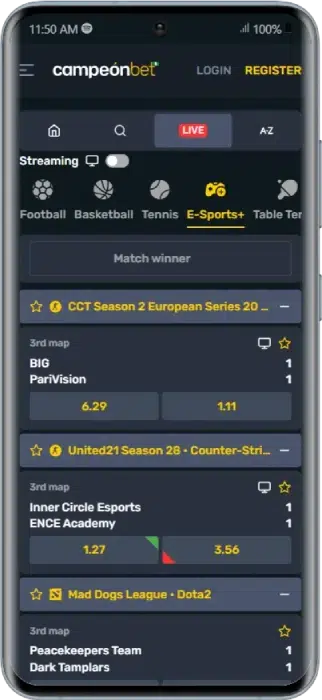
- Step ✅
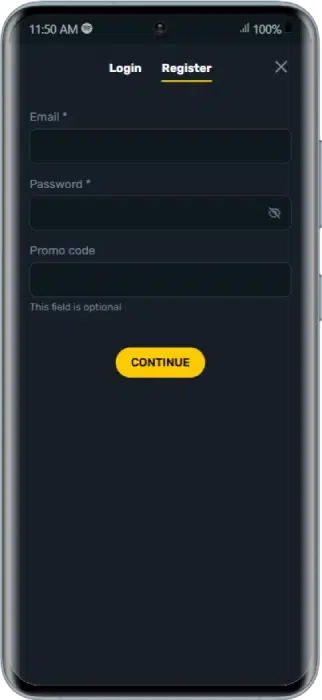
- Step ✅
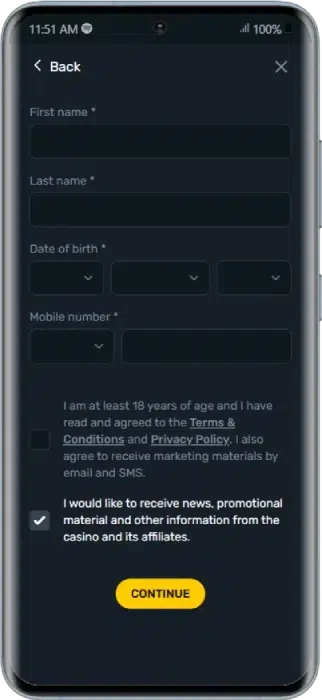
- Step ✅
What Do You Need to Register an Account at Campeonbet?
Before you start, get the basics ready. The form is quick, but you’ll need accurate details:
- ✅ You must be at least 18 years old
- ✅ A valid Nigerian phone number
- ✅ A working email address
- ✅ Your full name and date of birth, entered correctly
- ✅ You must reside in Nigeria (VPNs are prohibited)
- ✅ One account per person, using your own details
One thing worth knowing now: a government-issued ID (like your NIN) plus proof of address and proof of funds will be needed later for verification before you withdraw. You don’t need them to sign up, but having them ready saves time down the line. 📄
Understanding the Campeonbet Registration Bonus
New players can claim an exclusive 200% bonus up to ₦200,000 plus 50 free spins on Gates of Olympus. The offer is tied to your first deposit and can only be claimed once, so make it count. To get it, opt in on the bonus page.
Here are the key terms to keep in mind before you claim:
| Rule | Detail |
|---|---|
| Minimum deposit | ₦500 |
| Match | 200% of your first deposit |
| Maximum bonus | ₦200,000 + 50 free spins |
| Wagering | 30x the total bonus amount |
| Eligibility | New players only, one-time offer |
💡 With an active sports bonus, your maximum bet equals your deposit amount (or the amount that triggers the max bonus). Always read the full terms before you claim.
BONUS CODE
How to Verify Your Identity: The Campeonbet KYC Process
Verification, also called KYC, is the step that gets you paid. You must complete it before your first withdrawal. It confirms your identity, checks your age and helps keep the platform free of fraud.
Here’s what you’ll need:
- 🪪 Proof of identity: a government-issued ID such as Voter’s Card, Passport, Driver’s License or NIN
- 🏠 Proof of address: a utility bill, like an electricity bill
- 💳 Proof of funds: a bank statement or debit/credit card
How to verify:
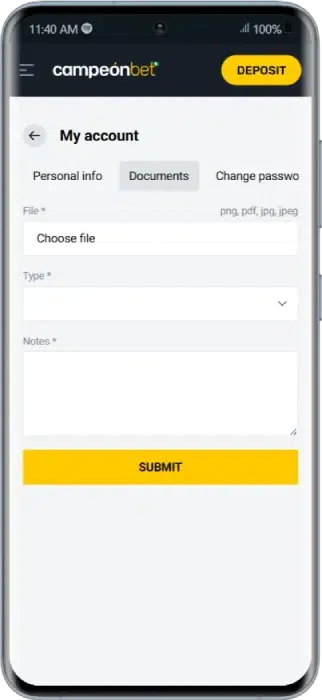
- Log into your account on the Campeonbet website
- Click the account icon beside your name at the top of the homepage
- Select My Profile
- Complete your personal information and tap Submit
- Tap Documents and follow the prompts to upload
Upload clear, readable copies to avoid delays. Campeonbet typically reviews documents within 24 hours of receiving them. 🔒
I’ve Registered at Campeonbet, What Are the Next Steps?
Account created and verified? Here’s how to get into the action:
- Log into Your Account
The next step after signing up and verifying your account is to log in. You should automatically be signed in after registering. If you’re not, tap the “Login” button on the homepage. Input the email address and password you used during registration to access your account.
- Deposit Fund
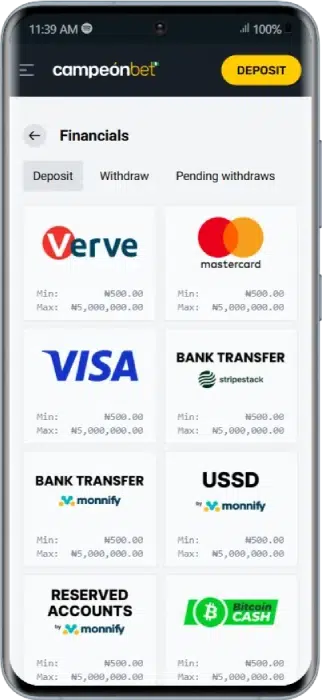
After assessing your account, the next step is to deposit funds. Making a first deposit also qualifies you for the welcome bonus. Click the “Deposit” button at the top of the homepage. You’ll find a wide range of deposit options. Below are some of the options.
- Verve
- MasterCard
- Visa Card
- Stripestack
- Monnify
- Bitcoin Cash
- Bitcoin
- Ethereum
- Litecoin
- USDT
The minimum deposit allowed is ₦500, and the maximum is ₦5,000,000. Select your preferred payment option to fund your account and follow the prompts.
Common Campeonbet Registration Errors and How to Fix Them
Sign-up is smooth for most people, but here are quick fixes for the usual hiccups:
My Location Is Blocked
You must be physically in Nigeria to register, and VPNs are prohibited. Turn off any VPN and make sure you’re accessing the site from within the country.
My Details Won’t Submit
Check every field is correct, especially your name and date of birth, and that they match your documents. Inaccurate or another person’s details will block sign-up.
The Page Won’t Load Properly
Technical glitches can interrupt the form. Refresh the page, check your connection, or try a different browser.
Still stuck? Campeonbet is known for swift customer support, so reach out and they’ll help sort it out. 💬
Final Verdict: Why You Should Open a Campeonbet Account
After running through the full process, Campeonbet stands out for how quick and clean sign-up is, wrapped up in around 2 minutes on a single form. Though newer to the Nigerian market, it’s licensed by the Cross River Lottery and Gaming Agency, has a solid track record of paying out, and backs it up with fast support and a polished, easy-to-navigate interface (with dark and light themes).
- ✅ Quick 2-minute registration
- ✅ 200% welcome bonus up to ₦200,000 + 50 free spins
- ✅ 30+ sports including the Nigerian Professional Football League
- ✅ Wide payment range, including crypto
- ❌ ID, address and proof of funds needed before withdrawals
- ❌ High 30x wagering requirement on the bonus
Campeonbet Registration FAQs
Do I need a promo code to register at Campeonbet?
No. Campeonbet’s welcome offer applies automatically once you sign up and make a qualifying first deposit. There’s no code to enter anywhere in the process.
How much do I need to deposit to get the full Campeonbet bonus?
You need to deposit ₦100,000 to trigger the maximum ₦200,000 bonus. Smaller deposits still qualify, just at a proportionally smaller bonus amount.
Can I withdraw the Campeonbet bonus money directly?
No. Bonus funds need to clear the 30x wagering requirement before they become withdrawable. Check the note on wagering above for how that’s calculated.
Are the 50 free spins separate from the Campeonbet sports bonus?
Yes. The 50 free spins apply to the Gates of Olympus slot in the casino section, while the 200% match is a sports betting bonus. They’re credited together but used in different parts of the site.
How do I reset my Campeonbet password?
Tap the password reset link on the login screen, confirm your registered email or phone number, and follow the steps to set a new password.
18+ , T&Cs apply, Play responsibly