



Your registered mobile number does most of the work on a BetKing account. It signs you in, it receives your password reset, and it is what verification is tied to. This guide covers signing in on a phone, resetting by SMS, and what to do when the number itself is the problem.
How to Sign In to BetKing on Your Phone
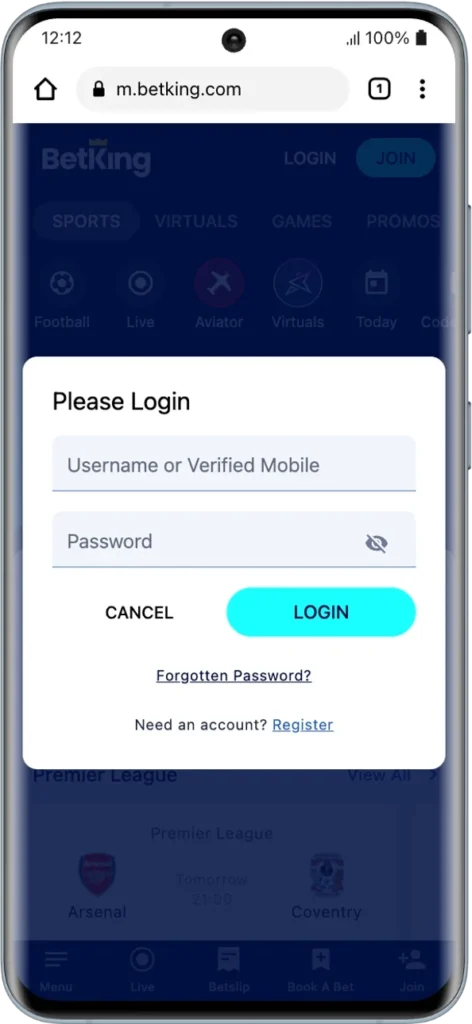
- Open the BetKing app or the BetKing site in your phone browser.
- Tap Login.
- Enter your username or your registered mobile number.
- Enter your password.
- Tap the login button.
Either identifier works, which helps when you can remember your number but not the username you picked at BetKing registration. Desktop takes the same two details in the same order.
BetKing Mobile Lite
BetKing Mobile Lite is the stripped back version of the site for weak connections and tight data. Sign in with exactly the same details. If the full site is slow to load on your network, switch to Lite rather than assuming your login is broken.
How to Reset Your BetKing Password
BetKing sends the reset by SMS, not by email.
- Tap Sign In.
- On the Sign In page, tap Forgot Password below the login button.
- Enter your username.
- Open the SMS BetKing sends to your registered mobile number.
- Follow the steps in the message to set a new password.
To change a password you still know, sign in, go to My Account, open Account Settings, select Change Password, enter your current password, then your new one. The new password must be between six and fifteen characters and cannot contain spaces.
If You Have Forgotten Your Username
The reset form asks for your username, so it cannot help you if that is the part you have lost. Contact BetKing customer services through live chat on the site, or by email, and have your registered mobile number and full name ready.
Verify Your Mobile Number Before It Blocks You
BetKing prompts customers to verify their registered mobile number, and the prompt runs on a countdown. Clear it when you see it rather than dismissing it, because an unverified number becomes a problem exactly when you need the reset SMS to arrive. The same verification underpins BetKing withdrawal checks.
Why You Cannot Log In to BetKing
| Problem | What to do |
|---|---|
| Username forgotten | Sign in with your registered mobile number instead |
| Password rejected | Use Forgot Password rather than repeating attempts |
| Reset SMS not arriving | Check signal, then request one fresh message |
| Number no longer active | Contact support, no SMS route will reach you |
| Phone verification prompt appearing | Complete it, an unverified number blocks recovery |
| Site loading slowly or not at all | Switch to Mobile Lite, or check your connection |
| Account deactivated | Contact customer services, this cannot be reversed from the login screen |
| BetKing self exclusion in place | Access cannot be restored on request |
What If You Changed Your Phone Number?
This is the hardest BetKing lockout to fix. Every recovery route runs through the registered number, so once it is gone, self service stops working. Contact customer services and expect to prove your identity before access is restored. If you still have access to your account today and your number has changed, update it now rather than later.
Keeping Your BetKing Account Safe
Change your password immediately if you think someone else has seen it, using the Account Settings route above. Do not share your password or any code that arrives by SMS, including with anyone claiming to be BetKing staff. Sign in only through the official BetKing Nigeria site or app.
Frequently Asked Questions
Can I sign in to BetKing with my phone number?
Yes. The login field accepts either your username or your registered mobile number.
How long can my BetKing password be?
Between six and fifteen characters, with no spaces.
Where does the BetKing reset message arrive?
By SMS, to the mobile number registered on your account.
How do I contact BetKing support?
Live chat on the site is the fastest route. The help centre also lists phone and email contacts.
Can I use BetKing on a slow connection?
Yes. Mobile Lite is built for exactly that and uses the same login details.
18+ , T&Cs apply, Play responsibly