



Players looking for a BC.GAME registration guide should keep reading. Our expert BC.GAME review will help you get started with the bookie, and here is some basic information about the sign-up:
| Registration process | Online |
|---|---|
| Sign-up time | 1- 2 minutes |
| BC.GAME verification | Personal information, identification and address proof, and a selfie Mobile number and email verification |
| BC.GAME register | Sign Up Here |
Step-by-Step: How to Register at BC.GAME via Mobile or Desktop
The signup process is genuinely quick. After testing it ourselves, we found you can be done in a couple of minutes. Here’s how it works:
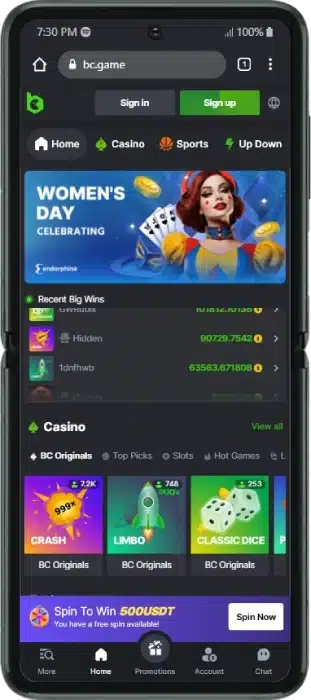
- Visit the BC.GAME betting site.
- Tap the ‘Sign Up’ button.
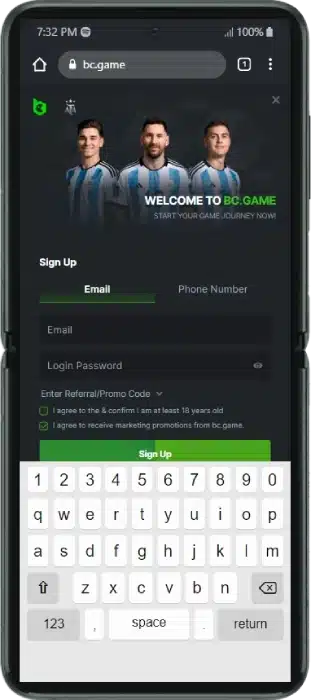
- Choose to register via email or phone number.
- Enter your email or mobile number and create a strong password.
- Add the BC.Game promo code regngn in the promo field.🎁
- Confirm you are 18+ and accept the User Agreement.
- Agree to receive promotional material (optional, you can change this later).
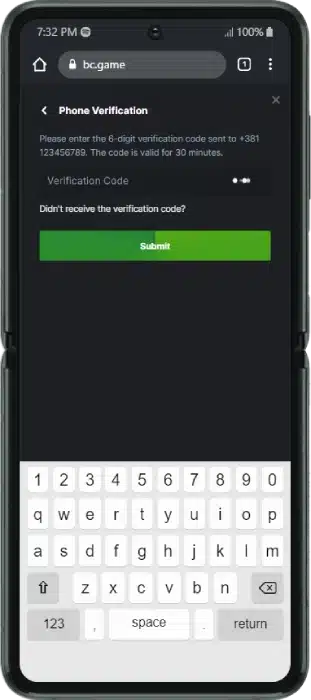
- Verify your mobile number if you signed up by phone.
- Submit the registration form.
A note on social signup: BC.GAME does not offer one-click registration through Google or Facebook. You sign up using your email or phone number as shown above.
📱 On mobile? The steps are identical. You can register through the mobile website or the BC.Game app. To install the app, tap the three dots at the top of your browser and select ‘Install app’. It’s optimised for both Android and iOS.
What Do You Need to Register an Account at BC.GAME?
A quick checklist so you’re ready before you start:
- ✅ You must be 18 or older. This is a strict requirement.
- ✅ A valid Nigerian phone number registered with the appropriate authority, which you’ll verify by SMS code.
- ✅ A working email address if you choose email signup.
- ✅ A strong login password that meets the security standards.
- ✅ Acceptance of the User Agreement after reading it.
Remember, each player is entitled to one account only. If you open additional accounts, all of them risk being shut down.
One thing to keep in mind: you won’t need to upload your ID just to register. But a government-issued ID will be required later when you make your first withdrawal. Details are in the verification section below. 👇
Understanding the BC.GAME Registration Bonus
After completing signup, you can claim a first deposit offer, and it’s one of the more generous welcome packages around. The bonus is tied to your first deposit, so you’ll need to fund your account to activate it.
When we tested it, our team made a minimum deposit of ₦2,000.00 to qualify. The full welcome offer runs as a tiered system totalling 280% up to ₦5,550,175, plus 20 Free Bets to use on sports markets. 🎁
Using the promo code regngn ensures you activate the latest welcome deal.
Here are the key rules at a glance:
| Detail | What to know |
|---|---|
| Welcome offer | 280% up to ₦5,550,175 + 20 Free Bets |
| Promo code | regngn |
| Min deposit (1st & 2nd bonus) | ₦2,000.00 |
| Min deposit (3rd & 4th bonus) | ₦3,000.00 |
| Wagering requirement | 20x before withdrawal |
| Minimum odds | 1.5 or higher per accumulator selection |
⚠️ 18+. Full T&Cs apply. Always read the complete terms before claiming.
How to Verify Your Identity: The BC.GAME KYC Process
Verification is what gets you paid. Once you register, BC.GAME has to verify your age and identity through detailed KYC (Know Your Customer) checks to keep the platform safe and secure. 🔒
Here’s what you’ll need to provide:
- Personal information: Your name, surname, date of birth and residential address.
- Photo ID: A clear scan or photo of your driving licence or government-issued ID.
- Proof of residence: A document issued within the last three months.
- A selfie: A photo of yourself holding your ID and a piece of paper showing the operator’s name, your username and the current date.
There’s a detailed KYC guide on the BC.GAME website worth reading to avoid common mistakes. Finish verification as soon as you can, because only verified players can withdraw. The good news: this is required only on your first withdrawal.
If you signed up by email, you’re also encouraged to verify your email and mobile number under ‘My Profile’ → ‘Security’.
Accessing Your New Account: How to Login to BC.GAME
Signing back in is easy. Enter the email or phone number you registered with, along with your password, and you’re in.
For extra protection, you can activate two-factor authentication under ‘My Profile’ → ‘Security’. 🔑
Forgotten your details? Use the password reset option on the login screen to regain access quickly.
I’ve Registered at BC.GAME, What Are the Next Steps?
Creating your account is just step one. Here’s what comes next:
Step 1: Deposit. Your bonus won’t activate until you fund your account. BC.GAME runs on crypto, so you’ve got several quick, secure options to choose from. Just deposit at least ₦2,000.00, anything less and the bonus won’t apply. 💳
Step 2: Activate your bonus. Give your deposit a minute to process, then check your account. Your welcome package and Free Bets should be sitting there, ready to use.
Step 3: Bet. Open the sportsbook and pick from the sports and eSports on offer. Add your selections, set your stake, and confirm your ticket. Quick tip: building an accumulator? Every selection needs odds of at least 1.5 to count toward your bonus. ⚽
Common BC.GAME Registration Errors and How to Fix Them
A few small issues pop up now and then. Here’s how to fix them fast:
- I didn’t get the SMS code
Check your phone number is correct and your signal is strong, then ask for a new code. On the app, try switching to mobile data. - My information won’t submit / I’m getting an error
This is almost always your connection. Restart your router or switch to mobile data. Also check you haven’t skipped any fields, and that you’ve ticked the 18+ and User Agreement boxes. - My password won’t accept
BC.GAME wants a strong password. Keep adjusting yours until the strength check turns green.
📞 Still stuck? Use BC.GAME’s live chat. It’s not 24/7, so message during active hours for a faster reply.
BC.GAME Registration FAQ
Finally, you can take a look at some of the most commonly asked questions about the BC.GAME sign up.
Why can’t I complete the BC.GAME registration process?
To create a BC.GAME account, an uninterrupted Internet connection is required. Also, the personal information entered must be valid, and a mobile number must be verified. You must fill in all the mandatory fields and check all the mandatory boxes.
Is BC.GAME registration free of charge?
Our team of experts signed up and found the registration is completely free. Players only need to add funds to their account to start placing bets.
Where can I find the BC.GAME registration form?
After selecting the BC.GAME register button at the top right of the home page, the BC.GAME sign up form will load.
How long does BC.GAME registration take?
We tested the process and found it takes only 1-2 minutes. We suggest players check their Internet connection first to avoid a prolonged sign-up.
Is BC.GAME registration legal?
Yes, this bookmaker is licensed and regulated by the Curacao Gaming Authority and accepts players from Nigeria. So, you can register on BC.GAME as long as you are 18 years old or older.
How can I delete my BC.GAME account?
You should reach out to the operator’s customer support team with this request. You can contact agents via live chat or email.
18+ , T&Cs apply, Play responsibly