



1xBet accepts more than one login credential, and picking the wrong one is the most common reason a sign in fails. This guide covers logging in on the app and mobile site, resetting your password, and working out which identifier your account actually uses.
Which 1xBet Login Detail Do You Need?
The identifier you use depends on which 1xBet registration method you chose.
| How you registered | What you log in with |
|---|---|
| One click | The account ID and password the system generated for you |
| By phone | Your registered mobile number |
| By email | Your registered email address |
| Social network or messenger | The same social account, tapped from the login screen |
Your account ID works regardless of which method you used. If you registered by one click and never added an email or phone number, the ID is the only identifier you have, so keep it somewhere safe.
How to Log In to the 1xBet App
- Open the 1xBet app on your phone.
- Tap the log in button.
- Choose your identifier: account ID, phone number or email.
- Enter your password.
- Tap to confirm and your account opens.
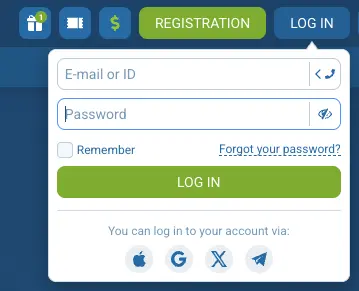
If you registered through a social network or messenger, skip the credential fields and tap the matching social icon on the login screen instead.
Desktop follows the same sequence with the same credentials, so there is nothing extra to learn if you switch to a computer.
How to Log In on the 1xBet Mobile Site
The mobile site uses the same credentials as the app, so there is no separate account to create.
- Open the 1xBet Nigeria site in your phone browser.
- Tap log in at the top of the screen.
- Enter your ID, phone number or email, then your password.
- Tap to confirm.
Logging in on the mobile site does not sign you out of the app. The two run separate sessions, so you can stay logged in on both.
Disclaimer: 1xBet does not have a license to operate in the US, Australia, Canada and Europe with the exception of Spain.
How to Reset Your 1xBet Password on Your Phone
- Tap log in, then tap the forgotten password link below the credential fields.
- Choose whether to recover by phone number or email.
- Enter the registered number or address and request the code.
- Enter the code you receive.
- Set a new password and log in with it.
If you registered by one click and never added a phone number or email, there is no recovery channel attached to the account. In that case you need to contact 1xBet support with your account ID rather than using the reset form.
Why Your 1xBet Login Is Failing
| Problem | What to do |
|---|---|
| Wrong identifier type | Try your account ID instead of your phone or email |
| Password rejected | Use the reset steps above rather than guessing repeatedly |
| Code not arriving by SMS | Check signal, wait, then request the code once more |
| No email or phone on the account | Contact support with your account ID |
| App crashes or will not open | Clear the app cache, then reinstall the current version |
| Site says it is unavailable in your country | Check your connection and confirm you are on the licensed 1xBet Nigeria site |
| Account restricted or closed | Contact support, this cannot be fixed from the login screen |
Repeated failed attempts can trigger a temporary block, so reset the password rather than trying the same details again.
Adding Recovery Details to a One Click Account
If you opened the account with one click, your profile starts with no email and no phone number attached. Open your profile settings after logging in and add both. Without them you cannot use the self service password reset, and every access problem becomes a support ticket.
1xBet Account Verification and Login
Verification is a separate step from logging in. You can normally sign in and place bets on an unverified account, but 1xBet withdrawals require identity documents. If you are being blocked at the login screen rather than at the 1xBet cashier, verification is not the cause.
Keeping Your 1xBet Account Secure on Your Phone
Use a password you do not use on any other site. Turn on any additional login confirmation the app offers in its security settings. Log out fully if you hand your phone to someone else, since the app keeps you signed in between sessions. Never enter your 1xBet details on a site that is not the official one, and treat anyone offering to recover your account for a fee as a scam. If you closed the account yourself or requested self exclusion from 1xBet, access cannot be restored on request.
Frequently Asked Questions
Where do I find my 1xBet account ID?
Your ID appears in your profile section once you are logged in. If you registered by one click, it was shown to you at sign up along with the generated password.
Can I log in to 1xBet without a password?
Only if you registered through a social network or messenger, in which case you tap that provider on the login screen instead of entering credentials.
Why does 1xBet keep me logged in on the app?
The app holds the session until you log out. Closing it does not sign you out, so use the log out option on a shared phone.
Can I use one 1xBet account on two phones?
Yes, the account is not tied to a device. You may be asked to confirm your identity when signing in somewhere new.
How do I change the phone number on my 1xBet account?
Contact support. Changing the registered number is not something you can complete from the app on your own.
18+ , T&Cs apply, Play responsibly